Windows 8 Start Menu Programs
STARDOCK START8 $US4.99
http://www.stardock.com/products/start8/
https://store.stardock.com/
STARTISBACK $US3 for 2 PCs
http://www.startisback.com/
http://www.startisback.com/#buy-tab
Reviversoft START MENU REVIVER Free
http://www.reviversoft.com/start-menu-reviver/
PC World said "Start Menu Reviver isn't
really a Windows 7 Start menu replacement. It's more like what
Microsoft might have created if they had decided to make a new Start
menu for Windows 8"
CLASSIC SHELL Free
http://www.classicshell.net/
=========================================================
Figure I will try Reviversoft Start Menu reviver because its free and it builds on the new windows look & feel
Installed and working.
Saturday, August 31, 2013

Wednesday, August 28, 2013
OXLEY SS Play - Video Production
FILMING
Use 3 cameras
Wide shot at back (Un attended)
Human (me) at the back with camera on tripod.
Student down the front.
All cameras recorded to SD card.
We recorded continuously so that I only have to adjust the lip sync once in post production.
Injested all 3 SD cards into the PC.
Edited with Serif MoviePlus X6.
This has a number of good points. The only negative is that it does not do a thing called 'multicam'
This multicam thing seems relativly new in the PC world. Multicam is the ability for a video editing program to injest video from multiple cameras that have all recorded the same event. Then to facilitate editing. There are two key features required.
This is a work in progress.
These option ideas are in no particular order.
1 SD CARD OPTION
We use our consumer camcorder HD SD card
and
Some other HD SD card camcorder.
At the back only. And then put it together on the computer.
Could even have a person up the front to get some other angles.
AUDIO - 2 mics on the lighting grid. Run the cables back to the 'other' HD camera.
2 BLACK MAGIC OPTION
Use Black Magic vision switcher.
Need to get a HDMI to composite converter
Need to check if I can read the Atmos Ninja files and edit them.
Need to work out what to do for audio
Need to buy some longish HDMI cables

3 ANALOGUE OPTION
AVE55 With Analogue Quads.
PD150 cameras.
Injest analogue video to our consumer camcorder and spit it out as firewire.
Find an old laptop with a firewire connector and use that to record to a USB hard disk drive.
Or
borrow one of Dean's recorders.
or record to our DVD recorder.
Use 3 cameras
Wide shot at back (Un attended)
Human (me) at the back with camera on tripod.
Student down the front.
All cameras recorded to SD card.
We recorded continuously so that I only have to adjust the lip sync once in post production.
Injested all 3 SD cards into the PC.
Edited with Serif MoviePlus X6.
This has a number of good points. The only negative is that it does not do a thing called 'multicam'
This multicam thing seems relativly new in the PC world. Multicam is the ability for a video editing program to injest video from multiple cameras that have all recorded the same event. Then to facilitate editing. There are two key features required.
- A method to assist in lining up the recordings. This seems to primarrily be done by the program looking at the audio tracks and lining up on the audio.
- A way of displaying multiple pictures on the screen at the same time.
This is a work in progress.
These option ideas are in no particular order.
1 SD CARD OPTION
We use our consumer camcorder HD SD card
and
Some other HD SD card camcorder.
At the back only. And then put it together on the computer.
Could even have a person up the front to get some other angles.
AUDIO - 2 mics on the lighting grid. Run the cables back to the 'other' HD camera.
2 BLACK MAGIC OPTION
Use Black Magic vision switcher.
Need to get a HDMI to composite converter
Need to check if I can read the Atmos Ninja files and edit them.
Need to work out what to do for audio
Need to buy some longish HDMI cables
3 ANALOGUE OPTION
AVE55 With Analogue Quads.
PD150 cameras.
Injest analogue video to our consumer camcorder and spit it out as firewire.
Find an old laptop with a firewire connector and use that to record to a USB hard disk drive.
Or
borrow one of Dean's recorders.
or record to our DVD recorder.
Oxley SS Play - Green Room Video
Megan is coordinating the school play.
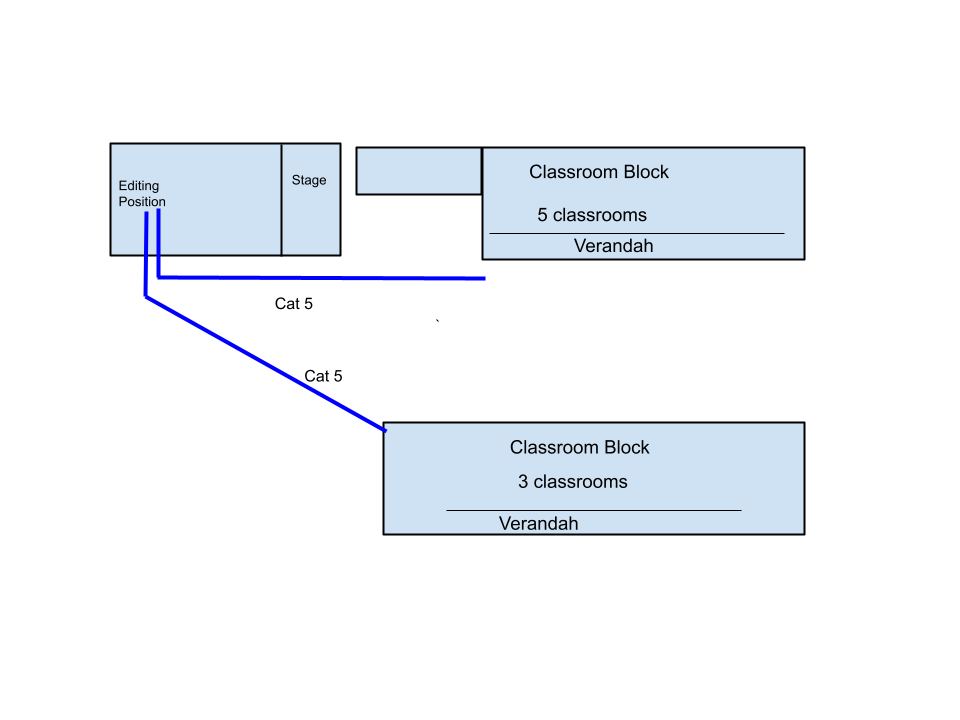
As far as I can tell pretty much the whole school is involved. There are multiple green rooms (Classrooms) in two class room blocks.
Each class room has a video projector and PA system complements of the education department.
 Scroll down to see the functional block diagram that goes with this picture.
On the left of the picture you can see the netbook computer with the writing on a blue background.
This picture was fed into the VGA to composite converter. The VGA to composite converter performed two functions. It converted the VGA signal to a composite video signal and then superimposed it on the live video.
The grey box with all the knobs and buttons is my Panasonic AVE-5 video switcher. This was used to select between two video sources. A DVD player that is sitting on top of the video monitor and a camera that is not shown in this picture. During the day I would play the DVD continuously on a loop so that there was always a signal being sent to the class rooms so that the teachers could connect up and gain some confidence before zero hour.
The video monitor showed the picture that was going to the class rooms via the computer system. The video was converted to USB using a Pinacle Dazzle (Not visible in the photo).
The AVE-5 video switcher also switches audio. The audio signal either from the DVD player or the camera as appropriate went into the Tascam US-122. This converted the analogue audio to USB.
The laptop sitting on top of the DVD player was Megan's EQ (Education Queensland) official computer. Programs (described below) took the USB inputs and made them available on the ethernet.

This drawing shows the ethernet distribution to the classrooms. The purple block represents the photo and the block diagram shown above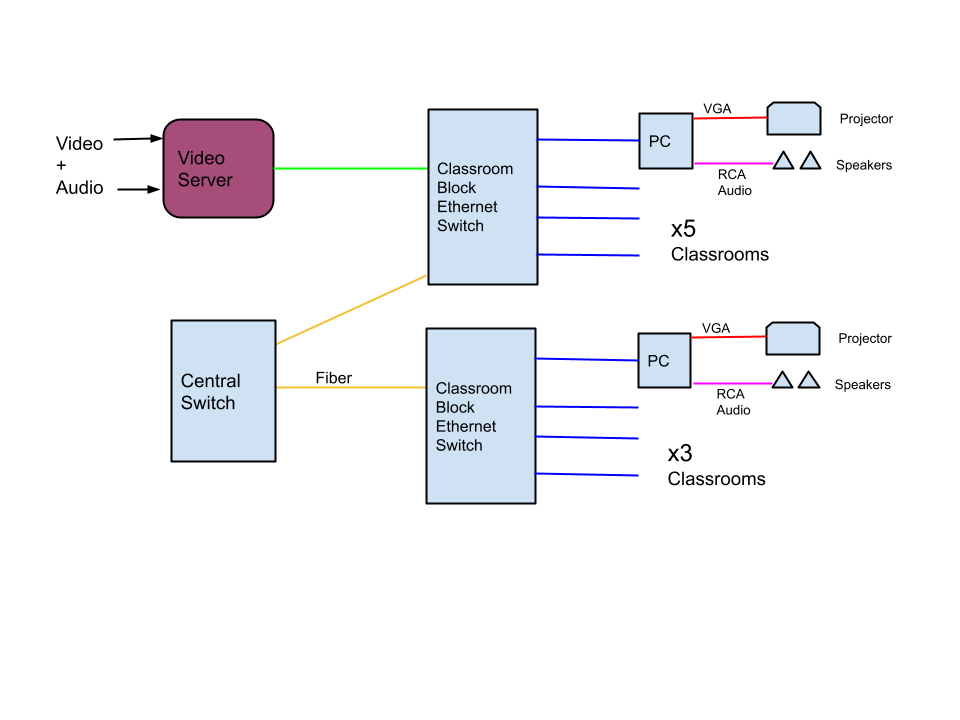
To monitor the audio level coming into the laptop I used a level meter from darkwood designs.
Tests had shown that in the classroom we had to keep the audio level high. There seems to be loss in the system. How that happens in a digital world is hard to fathom. So we had a student watch the level meter on the laptop and ride the gain controls of the Tascam to keep the level up.
VIDEO SERVING
I used VLC media player to stream the video.
I used Video MPEG-2 + MPGA (TS) because I found that I could play that on Windows Media Player. This was already installed on the the teachers laptops and some of the student computers.
Media>Stream
Select the "Capture Device Tab"
Video Device -> Select Pinacle Dazzle
Audio Device -> Select Tascam US-122
Click Stream (Bottom Right) Then Next
Destinations: Choose HTTP.
Type go.mpg
then click Add.
Note: Do NOT select display locally. Seems to use a lot of CPU power.
Transcoding Options: Choose Video MPEG-2 + MPGA (TS)
Click the little spanners button and change the frame rate to 25fps.
Next then select "Stream all elementary streams" and "SAP anounce" hey it may not be necessary but....
Click stream.
Look at the numbers in the bottom left of the screen. If they are moving then it is probably working.
CLASSROOM COMPUTERS
We mostly used the teachers computers connected to video projectors but some classes found this boring and watched DVDs. Some of them used student computers to watch the feed and get their cues. Although all the teachers laptops worked not all the student computers worked. So much for a standardised environment.
to Receive the Stream with Windows Media Player:
1 Run Windows Media Player.
2. Look For the menus across the top. If they are not there type Control-M to make the menu bar visible.
3. Choose File>Open URL
4. Type
http://10.40.123.456:8080/go.mpg click and wait about 30 seconds.
5. maximise the screen.
PROBLEMS AND GOTCHAS
There was a delay between the analogue video and the picture shown by windows media player. This would start out at about 30 seconds delay but gradually increase to several minutes over the course of the day. I tried to counter this by changing the video rate to 25fps. In reality I do not think this made any difference.
Selecting one audio channel distroyed the audio. sounded a bit like a chain saw. I suspect that VLC still sent out two channels of audio with every second packet all zeros.
After a couple of days Megan's computer anounced that its hard disk was full. I suspect something was caching the video.
=============================================================
PLAN B MULTICAST Use wireless or the existing LAN
Need a server.
http://en.wikipedia.org/wiki/Real_Time_Streaming_Protocol
And a cheap client.
Rasberry Pi?
Instructions
I get about an 8 second delay between my laptop camera source and output on a second instance of VLC on the same computer.
Cant get a second PC running VLC to connect. Firewall?
The error is
"Your Input Cannot be opened
VLC is unable to open the MRL 'http"//192.168.xxx.125/go.mpg'. Check the log for details.
tried
http://192.168.xxx.125:8080/go.mpg and that worked.
Client has 6 seconds delay
Tried to send .asf
This works with about 6 seconds of delay.
Actually I think the delay is irrelevant. We will just have to make sure that they can not hear it live and delayed. That would be quite confusing.
Now to try UDP-> fail. Need more info.....
=============================================================
:8080/go.mpg -> does not work as it is not mpeg encoded
Video - Mpeg-2 +MPGA(TS)
:8080/go.mpg -> works on firefox
works on EQ computer with some pauses. Wont run on IE on my netbook.
MPEG TS vs MPEG PS
PLAN A
Run Cat 5 using composite to cat-5 converters at each end. These provide video + 2 audio and I believe ground loop isolation. (Need to check).
Then a VDA and Audio DA.
From the VDA run composite in coax to each projector
From the ADA run what? Mic cable??? to each PA system.
Will need XLR to RC adapters x 8.
May need hum buckers and audio isolation transformers too. A good reason to get all this in early so if there is hum there is time to humm think about it.

As far as I can tell pretty much the whole school is involved. There are multiple green rooms (Classrooms) in two class room blocks.
Each class room has a video projector and PA system complements of the education department.

On the left of the picture you can see the netbook computer with the writing on a blue background.
This picture was fed into the VGA to composite converter. The VGA to composite converter performed two functions. It converted the VGA signal to a composite video signal and then superimposed it on the live video.
The grey box with all the knobs and buttons is my Panasonic AVE-5 video switcher. This was used to select between two video sources. A DVD player that is sitting on top of the video monitor and a camera that is not shown in this picture. During the day I would play the DVD continuously on a loop so that there was always a signal being sent to the class rooms so that the teachers could connect up and gain some confidence before zero hour.
The video monitor showed the picture that was going to the class rooms via the computer system. The video was converted to USB using a Pinacle Dazzle (Not visible in the photo).
The AVE-5 video switcher also switches audio. The audio signal either from the DVD player or the camera as appropriate went into the Tascam US-122. This converted the analogue audio to USB.
The laptop sitting on top of the DVD player was Megan's EQ (Education Queensland) official computer. Programs (described below) took the USB inputs and made them available on the ethernet.
This drawing shows the ethernet distribution to the classrooms. The purple block represents the photo and the block diagram shown above
SOFTWARE
AUDIOTo monitor the audio level coming into the laptop I used a level meter from darkwood designs.
Tests had shown that in the classroom we had to keep the audio level high. There seems to be loss in the system. How that happens in a digital world is hard to fathom. So we had a student watch the level meter on the laptop and ride the gain controls of the Tascam to keep the level up.
VIDEO SERVING
I used VLC media player to stream the video.
I used Video MPEG-2 + MPGA (TS) because I found that I could play that on Windows Media Player. This was already installed on the the teachers laptops and some of the student computers.
Media>Stream
Select the "Capture Device Tab"
Video Device -> Select Pinacle Dazzle
Audio Device -> Select Tascam US-122
Click Stream (Bottom Right) Then Next
Destinations: Choose HTTP.
Type go.mpg
then click Add.
Note: Do NOT select display locally. Seems to use a lot of CPU power.
Transcoding Options: Choose Video MPEG-2 + MPGA (TS)
Click the little spanners button and change the frame rate to 25fps.
Next then select "Stream all elementary streams" and "SAP anounce" hey it may not be necessary but....
Click stream.
Look at the numbers in the bottom left of the screen. If they are moving then it is probably working.
CLASSROOM COMPUTERS
We mostly used the teachers computers connected to video projectors but some classes found this boring and watched DVDs. Some of them used student computers to watch the feed and get their cues. Although all the teachers laptops worked not all the student computers worked. So much for a standardised environment.
to Receive the Stream with Windows Media Player:
1 Run Windows Media Player.
2. Look For the menus across the top. If they are not there type Control-M to make the menu bar visible.
3. Choose File>Open URL
4. Type
http://10.40.123.456:8080/go.mpg click
5. maximise the screen.
PROBLEMS AND GOTCHAS
There was a delay between the analogue video and the picture shown by windows media player. This would start out at about 30 seconds delay but gradually increase to several minutes over the course of the day. I tried to counter this by changing the video rate to 25fps. In reality I do not think this made any difference.
Selecting one audio channel distroyed the audio. sounded a bit like a chain saw. I suspect that VLC still sent out two channels of audio with every second packet all zeros.
After a couple of days Megan's computer anounced that its hard disk was full. I suspect something was caching the video.
=============================================================
PLAN B MULTICAST Use wireless or the existing LAN
Need a server.
http://en.wikipedia.org/wiki/Real_Time_Streaming_Protocol
And a cheap client.
Rasberry Pi?
VLC Multicast
VLC mediaplayer can be used as both the streaming server and the client.Instructions
I get about an 8 second delay between my laptop camera source and output on a second instance of VLC on the same computer.
Cant get a second PC running VLC to connect. Firewall?
The error is
"Your Input Cannot be opened
VLC is unable to open the MRL 'http"//192.168.xxx.125/go.mpg'. Check the log for details.
tried
http://192.168.xxx.125:8080/go.mpg and that worked.
Client has 6 seconds delay
Tried to send .asf
This works with about 6 seconds of delay.
Actually I think the delay is irrelevant. We will just have to make sure that they can not hear it live and delayed. That would be quite confusing.
Now to try UDP-> fail. Need more info.....
=============================================================
VLC HTTP SERVING
Video - WMV + WMA(ASF):8080/go.mpg -> does not work as it is not mpeg encoded
Video - Mpeg-2 +MPGA(TS)
:8080/go.mpg -> works on firefox
works on EQ computer with some pauses. Wont run on IE on my netbook.
MPEG TS vs MPEG PS
Container formats
MPEG-2 specified 2 container formats, ts and ps. Containers hold video and audio information in them, and package them up so it can be sent over a network or stored on disk.- ts (Transport Stream) should be used to store or send data where data loss will probably occur, such as over a network.
Windows Media Encoder
This also seems to work. Also seems to have about 6 seconds delauPLAN A
Run Cat 5 using composite to cat-5 converters at each end. These provide video + 2 audio and I believe ground loop isolation. (Need to check).
Then a VDA and Audio DA.
From the VDA run composite in coax to each projector
From the ADA run what? Mic cable??? to each PA system.
Will need XLR to RC adapters x 8.
May need hum buckers and audio isolation transformers too. A good reason to get all this in early so if there is hum there is time to humm think about it.
Tuesday, August 20, 2013


Monday, August 19, 2013
Chris's 14th Birthday Party
Chris, two friends from school, Megan, Frank, Dan and Jemma ascended the Toowoomba range on Saturday evening for a sleepover in mum's house in Boyce ct.
 in a nutshell. the first Sunday AM activity was to "put the trampoline on the ute".
The tramp was one of a couple of purchases made not long after dad died and mum moved to Toowoomba. Other memorable purchases were the yellow van and a chainsaw.
The tramp was a combined present for the 4 of us and has lasted remarkably well. It's a bit rusty but you can still jump on it. Apart from a couple of weeks when it lived and was repainted inside the Sherwood UC hall, it has spent it's entire 30 year life outside.
x

Climbing Tabletop was the keynote activity for Sunday. We drove to the Eastern end of South Street.

 Jemma and Megan with South Street visible in the background.

We heard some russling off to the side of the trail. After standing still and waiting the lizard moved and we could see him (or her). The strange thing is that he her it was much further away than he she it sounded.

 We walked off.

Found a snake.
Luckily protected by legislation meant I did not have to dissuade Dan from picking it up and carrying it out.


DEF


Long grass on top. Just calling out for playing hide and seek.
They would drop down and become invisible. Megan and I would hunt and it was hard to find them. You pretty much had to stumble over them although movement made it much easier to spot them
The tramp was one of a couple of purchases made not long after dad died and mum moved to Toowoomba. Other memorable purchases were the yellow van and a chainsaw.
The tramp was a combined present for the 4 of us and has lasted remarkably well. It's a bit rusty but you can still jump on it. Apart from a couple of weeks when it lived and was repainted inside the Sherwood UC hall, it has spent it's entire 30 year life outside.
x
Climbing Tabletop was the keynote activity for Sunday. We drove to the Eastern end of South Street.
We heard some russling off to the side of the trail. After standing still and waiting the lizard moved and we could see him (or her). The strange thing is that he her it was much further away than he she it sounded.
Found a snake.
Luckily protected by legislation meant I did not have to dissuade Dan from picking it up and carrying it out.
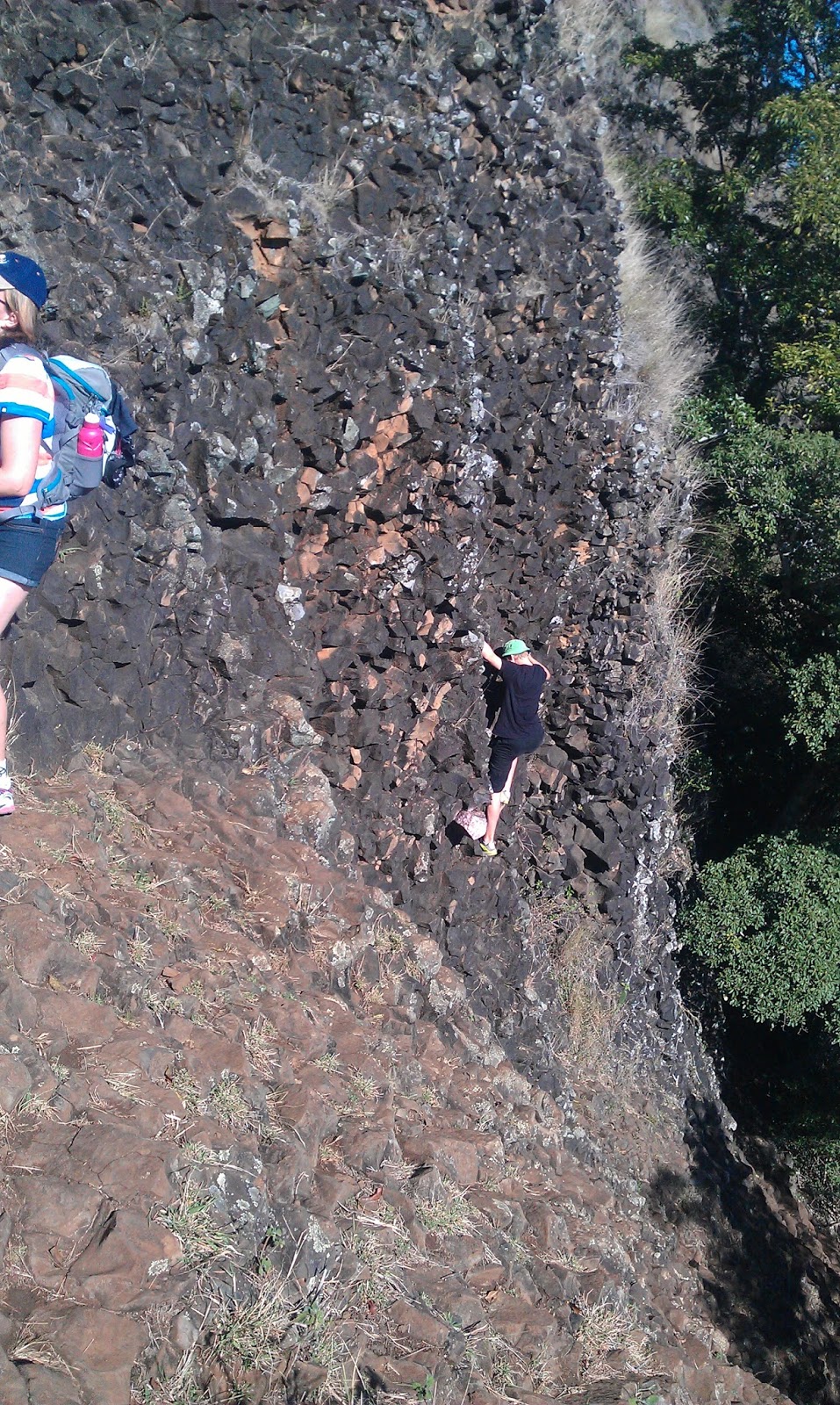
DEF
Long grass on top. Just calling out for playing hide and seek.

They would drop down and become invisible. Megan and I would hunt and it was hard to find them. You pretty much had to stumble over them although movement made it much easier to spot them
Friday, August 16, 2013

BGS yr9 trivia
Hiding in this picture are three guys I row with - Garry, Kenny & Mark.
This was a fund raising trivia night for grade 9 students and parents. Held at Brothers leagues club. It was areally great night. The first BGS event I have been to where the kids and parents sit at the same table. It was great.

This was a fund raising trivia night for grade 9 students and parents. Held at Brothers leagues club. It was areally great night. The first BGS event I have been to where the kids and parents sit at the same table. It was great.

Subscribe to:
Posts (Atom)

