Search This Blog

Saturday, March 23, 2019

2019 Australian Rowing National Championships

Jemma and I (Frank) travelling to Sydney.  Jemma is going to compete in the Australian Rowing National Championships.

Useful links
https://ra.rowingmanager.com/regattas/4434/entries
https://regattas.rowingnsw.asn.au/

There will be a live stream but the link is available yet.
The draw showing lanes is not available until Sunday (We believe)

She is entered in 3 events indicated by stars ***.
The other events follow on depending on how she places in the heats.
If she does well then we have Tuesday off.  If medium then Tuesday is a big day.  If she bombs in her heat then Tuesday is also a day off.

MONDAY

***8:00-8:25am CWU171x U17 single scull Heat Lane (B/N ) 2000m
***3:45-4:10PM CWU172x U17 double scull HEAT Lane (B/N ) 2000m

TUESDAY

 8:00-8:25AM CWU171x U17 single scull scull REPECHARGE Lane (B/N ) 2000m
 2:15-2:35PM CWU172x U17 double scull REPECHARGE Lane (B/N ) 2000m

WEDNESDAY

 8:00-8:15AM CWU171x U17 single scull SEMI FINAL Lane (B/N ) 2000m
11:30-11:35AM CWU172x U17 double scull SEMI FINAL Lane (B/N Y4) 2000m
***3:10-3:25PM CWU174x+ U17 quad scull HEAT Lane (B/N ) 2000m

THURSDAY

7:55-8:00AM CWU171x U17 single scull A/B FINAL Lane (B/N ) 2000m
12:30-12:45PM CWU174x+ U17 quad scull Repecharge Lane (B/N ) 2000m

FRIDAY

 8:00AM CWU172x U17 double scull FINAL Lane (B/N ) 2000m
12:20-12:25PM CWU174x+ U17 quad scull SEMI FINAL Lane (B/N ) 2000m

SATURDAY

8:00AM CWU174x+ U17 quad scull FINAL Lane (B/N ) 2000m


Friday, March 22, 2019

stop microsoft teams opening on startup

CTRL SHIFT ESC - Bring up task manager
Click Startup tab
Observe the thing called Update with a blue icon that includes a white "T"
Click that.  Click the Disable button atthe bottom right.
Reboot to test


Thursday, March 14, 2019

Speeding Fine in the Brigo bus

Last year I got done for doing 60 in a 50 zone in the Brigo bus.

The ticket was sent to the school.  They contacted me on 13-FEB-2019 and I responded within a day that I agreed it was me and I  filled in the stat dec and they sent it in.  The new ticket (I think) turned up at Calston st a few days ago but now I cant find it.

I had not received the personal infringement notice so I decided to look into it.


Going to try and work out how to pay on line

Firstly I created a QGOV account.

https://www.qld.gov.au/transport/safety/fines/demerit

Finally after getting a access code emailed to me I discover
2-3-2018  3 Points
25-9-2017 3 points.

 I logged onto my QGOV account and did not see the infringement listed so I called the speeding ticket people on 12 23 80 and spoke to Vina. She advised that the time had expired for the statutory declaration to be actioned and that I had to do two things:
1. A self nomination
2. Get onto SPER and get a 14 day hold on the fine.

I then called the road safety camera office on 1300 360 610 and spoke to Tracey.
She advised that I need to complete the stat dec and fax it. can't do email for some legal reason.
The fax numbers are 07 3099 6113 and 07 3099 6138.

 I then called SPER (I don't know what SPER stands for) on 1300 365 635 I spoke to Tess.
 She put a 14 day hold on your debt.
The SPER Contact ID Number is 7049 6294 Tess advised that they need to hear from the Road Safety Camera Office within 14 days or they reimpose the fine.

 I asked someone along the way what had happened and they said the original stat dec had been rejected but they said that as I was not an authorised representative of the school that they could not tell me why it was rejected.

14-03-2019 ACTION - done
Stat dec completed and witnessed and faxed to the Road safety camera office.

------------------------
22-03-2019 update
Phone Road Safety Camera Office on  1300 360 610
Joshua advises:
1. New ticket issued yesterday.
2. SPER will have been informed automatically. No need to call them.
Joshua will email me a copy.


Tuesday, February 26, 2019

Google contacts search sucks

The new google contacts suck so much I am thinking of investigating alternatives.  I wonder if hotmail still exists?

Anyway I went to search for chris and I get 7 suggestions.
I don't see the chris I want.
Maybe I got the name wrong.
Eventually I find the last name and I search for Chris Cot...
and low and behold his details are in my contacts.

What is the point of 7 suggestions with no scroll bar and no indication there are more than 7 matches.
The problem with google is that they keep changing the stuff that works and don't simply fix the shortcomings.  The old contacts manager was much better.


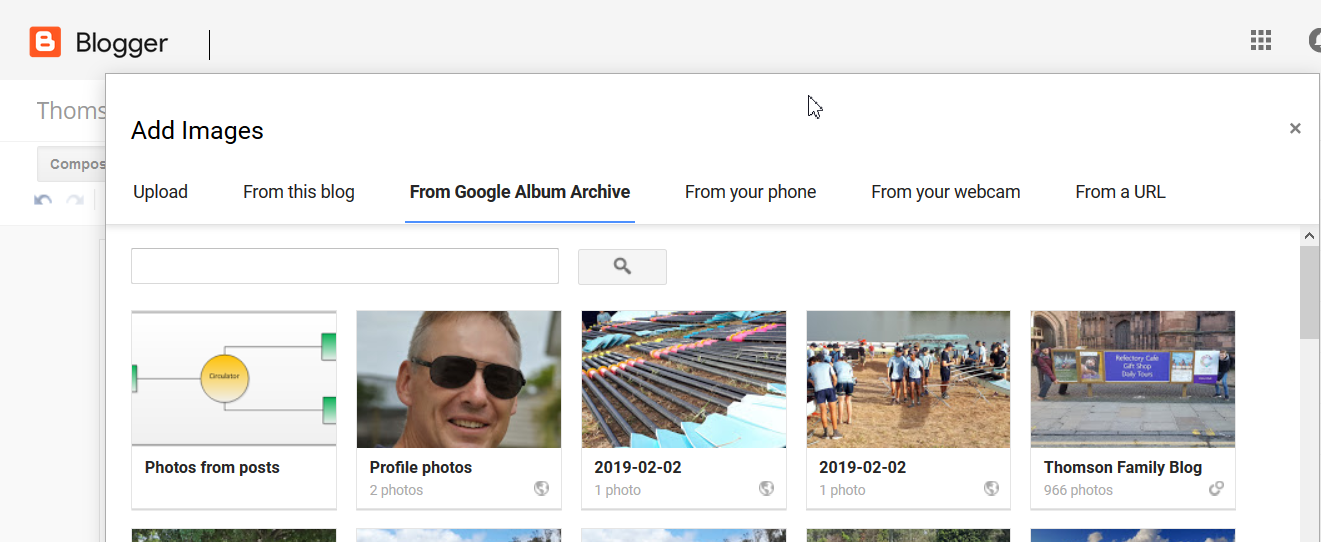
Adding pictures to Blog from google photos

The problem I have is adding pictures from google photos
When I take photos on my Anroid phone and then open the photos app on the phone, the photos are automatically uploaded to google and appear at
photos.google.com        all OK so far.

When I compose a blog with blogger I should be able to insert a picture from google photos.

Method 1 - Does not work
Within  blogger choose "From Google Album Archive" - The photo does not appear.  It seems to be a bit random what photos appear here.

Hang on ? Update - 15 minutes or so later and the dog picture is now visible here.

 Method 2 - Does not work
Using a URL from photos.google.com and pasting that into the blogger option "from a URL" even though if I post that URL directly into the browser, it does bring up the photo


photos.google.com
Accessed from web browser.


From inside blogger (on desktop browser).
Choose Add Image and this screen comes up.  Note it offers a couple of tiles with one or two pictures from 2019.


This is from
photos.google.com
Choose the create link option


It actually does not matter whether I use the link created above
https://photos.app.goo.gl/n4dJ6zqebkX2fvKD7
OR the URL
https://photos.google.com/photo/AF1QipMGBAMtk594a5tyth4GytNqc61pL4513v-2wqC5
Either type of link creates this error.

--------------------------------------------------

Interestingly when I open the bit where I select google applications I see all sorts of interesting programs like "Keep" Classroom, Jamboard and collections.  I note google+ which I think is being discontinued.  I cant help thinking that google create and kill off so quickly.  Because they create quick there are rough edges.  Shortcomings.  Half baked.  If they spent a little more time refining they might find more people using.


Lucy Arrives 2am

A fun Lucy adventure

It's 2am and I'm awake. Not unusual because I'm a poor sleeper. The cat is sitting up on my bed. I am listening and I can hear the light rain and trees rustling and feel the coolness blowing in the window.

 I can hear a tinkle sound and noise at the back door. I'm wondering if I've got a possum or animal trying to get in and because I'm half asleep at 2am I'm thinking maybe a burglar.

 Guess who I find at the back door? I open it and there's Lucy.

Wet and skittish. She's come all the way from Megan's house at Sherwood. She runs in and out and in again and up and down the back stairs. As she pauses briefly I pat her and feel she's wet.

I gather towels and dry her and make her a bed. Now she's sleeping soundly


Wednesday, February 6, 2019

Reformat Toshiba Z20t

see https://thomsoneu.blogspot.com/2017/06/restoring-toshiba-z20t-notebook.html

1.  Backed up everything to external hard drive

 2.  Did the restore and delete my files thing
Setting>Update & Security>Recovery
choose "Remove Everything"

3 Install Microsoft Office 365

4 Install open source programs from Ninite.com
   7zip
   firefox, Chrome
   Notepad++
   Windirstat
   K-lite Codecs
   VLC
   GIMP
   Classic Start
   PDF Creator
   Foxit Reader


5 Install non Ninite programs
   Adobe Acrobat Reader (Be very careful not to accept the dodgy spam includes)
    E-Drawings Viewer.    http://www.edrawingsviewer.com/
    Screen Hunter  http://www.wisdom-soft.com/downloads/downloadfiles.htm


6 Thunderbird - Install & Configure

Downloaded & installed Thunderbird mail client.
On first run it pops up a wizzard
a.  Said no to create a new account
b.  Mail Account Setup
     Your Name:  Frank Thomson
     Email_Address: frankt2010@gmail.com
     password:   xxx
     Remember password ticked
It says looking up configuration editor etc etc etc
Configuration found in Mozilla ISP database
c.  Select the IMAP (remote folders) option.  Click Done.  And wow there are my folder and it is busy trying to download all sorts of things.

d Fix the email address - Change to frank.thomson@syndetic.com.au
   Tools>Account Settings
       Account_Name:  frankt2010@gmail.com  -> left as is
       Your Name: Frank Thomson
        Email Address:    frankt2010@gmail.com  -> frank.thomson@syndetic.com.au
       Reply-to-Address: (blank)   -> frank.thomson@syndetic.com.au

e SIGNATURE
  Tools>Account Settings
  in the signature text box in the middle of the window, add:
Frank Thomson
Director
Syndetic Pty Ltd
4 / 20 Cansdale St
YERONGA 4104 Brisbane Australia
Tel +61 7 3255 8900, Mobile +61 414 329 164, Fax +61 7 3255 8901

f Fix default reply to behaviour -
   Tools>Account Settings>

   Select "Composition and Addressing", Then,
    Drop down Box, select "Start my reply above the quote"
    OK
g Address Book Synchronisation
   Tools>Add ons>
    gContactSync (Google Contact Sync)
    Restart Thunderbird
    Window popped up: "Welcome to the gContactSync Wizard"
        Use an existing account....
        Sign in.
        Allow access
        Address Book to synchronize:
        Groups and Contacts to Synchronize: All groups and contacts
        Pick the direction for synchronization:  complete
        Clear the box - skip contacts without an email address (to get all)
    Tools>Addons > Extensions.
    Under Zindus, click Options.
        New window opens with nothing in he accounts box.
        Click Add

h. Thunderbird Calendar
Give up on Lightning. that seemed to have been installed automatically.  "Removed" it.
Down load extension "Open Google Calendar" - It just worked.  I did not even have to reenter my credentials.

--------------------------------------------------------------------------------------------


7 Remove wakeup Password
Start>Settings>Accounts>Sign-in options
Require Sign in (Drop down box at the top) --> Never
PIN  -->  "Remove" 
https://www.windowscentral.com/how-prevent-windows-10-requiring-password-when-resuming-sleep
a. Open Settings.
b. Click on Accounts.
c. Click on Sign-in options.
d. Under "Require sign-in," choose Never from the drop-down menu to complete the task

Press Win+R, enter "netplwiz", which will open the "User Accounts" window.
Un Check the “Users must enter a username and password to use this computer” option and
click Apply.
Restart your computer and the system should not prompt you to enter your password at the login screen.
This is obviously less secure.


8  Brother P-Touch 9800
Get the driver and the ptouch editor from
http://support.brother.com/g/b/downloadlist.aspx?c=au&lang=en&prod=9800neas&os=10011
Select "Brother peer-to-peer network printer"

P-touch Editor5.x
PT-9800PCN Printer Driver

9  IMAGE RESIZER
http://www.bricelam.net/ImageResizer/

10 Remove Microsoft Teams
What a pain in the ass.  Where did it even come from.  When I boot my computer up comes this thing wanting me to log into microsoft teams.  Sounds like google plus from a different multi national.
Start>Control Panel>Programs and Features>
Find microsoft teams.
Click uninstall.
ahh.  Reboot just to be sure,
aghhh it's come back again and again
fixed here
https://thomsoneu.blogspot.com/2019/03/stop-microsoft-teams-opening-on-startup.html

11 XAMPP

Download and install
Run XAMPP & Configure PHP
Make these changes
post_max_size = 8M   Unchanged
upload_max_filesize = 2M   -> Changed to 8M